
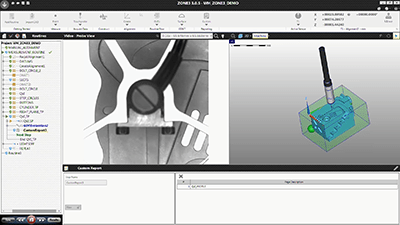
ZONE3 is a powerful, CAD-enabled, 3D metrology software application. With it, you can
use a combination of the latest optical, laser, and touch probe technologies to measure
parts quickly and accurately.
ZONE3 features a full set of image processing tools, geometric functions, ANSI/ISO
tolerancing (including GD&T), and a robust graphical reporting engine.
The intuitive graphical user interface offers a real-time video display, an interactive model
of the part under analysis, and the presentation of measurement results, all of which are
updated dynamically.
ZONE3 supports the import of CAD files in many popular formats to significantly reduce
the time it takes to enter dimensions and build part routines. Although ZONE3 is designed
to work with CAD, you can still use ZONE3 without a CAD file. Simply create a part routine
from a sample part to measure additional samples of that part.
| Module 1 | Video Controls | |
|---|---|---|
| Unit 1 | How To Power Up The System | |
| Unit 2 | Joystick Control For Lighting | |
| Unit 3 | Video Controls - Basic Lighting Group | |
| Unit 4 | Video Controls-Presets | |
| Unit 5 | Video Controls - SRL | |
| Unit 6 | Video Controls - Pseudo Colour | |
| Unit 7 | Video Controls - Saturation Threshold | |
| Unit 8 | Video Controls-Named Lighting Set | |
| Unit 9 | Video Controls - Frame Integration | |
| Unit 10 | Video Controls - Light Meter | |
| Unit 11 | Adjusting Unit And Precision | |
| Module 2 | Part Setup | |
| Unit 1 | Part Setup Without Cad - 1st Method - Digital Readout (DRO) Window | |
| Unit 2 | Part Setup Without CAD - 2nd Method Machine Alignment | |
| Unit 3 | Part Setup With CAD - 1st Method Dro | |
| Unit 4 | Part Setup With CAD - Machine Alignment | |
| Unit 5 | Part Setup Instruction | |
| Module 3 | Full Alignment with CAD | |
| Unit 1 | Full Alignment With CAD | |
| Module 4 | Basic Steps for Datum Setup | |
| Unit 1 | 6 Basic Steps For Datum Setup On 2D Training Part | |
| Module 5 | Measure And Acquire Data Ribbon Groups-Targets | |
| Unit 1 | Circle Target | |
| Unit 2 | Crosshair Target | |
| Unit 3 | Protractor Target | |
| Unit 4 | Point Entry | |
| Unit 5 | Feature Finders | |
| Unit 6 | Strong Edge | |
| Module 6 | Construct | |
| Unit 1 | Construct Width | |
| Unit 2 | Construct Distance | |
| Unit 3 | Construct Angle | |
| Unit 4 | Construct Point | |
| Unit 5 | Construct Line | |
| Module 7 | Model Window | |
| Unit 1 | Model Window | |
| Module 8 | Routine Work | |
| Unit 1 | Starting, Saving, And Opening A New Project | |
| Unit 2 | Running And Stopping A Routine | |
| Unit 3 | Routine Search | |
| Module 9 | Chapter 9 | |
| Unit 1 | Nominals And Tolerances | |
| Unit 2 | Result Browser | |
| Unit 3 | File Output | |
| Module 10 | Chapter 10 | |
| Unit 1 | Adjusting Finders | |
| Unit 2 | Adjusting Steps | |
| Unit 3 | Update Selected | |
| Module 11 | Copy | |
| Unit 1 | Linear Copy | |
| Unit 2 | Polar Copy | |
| Module 12 | Chapter 12 | |
| Unit 1 | Using Focus Tool | |
| Unit 2 | Using Focus Finder | |
| Unit 3 | Obtain Z Height By Constructing Distance | |
| Unit 4 | Obtain Z Height By Translating Alignment | |
| Unit 5 | Obtain Z Height By Measuring Two Planes | |
| Module 13 | Chapter 13 | |
| Unit 1 | Flatness | |
| Unit 2 | Position | |
| Unit 3 | Angularity |